
1.1 Login to Starter using your email address and Password.
The Home screen will display.
1.2 Navigate to the asset that you wish to delete.
1.3 Right-click on the asset.
Note: You can only delete one asset at a time
Options will appear underneath, including Delete asset.
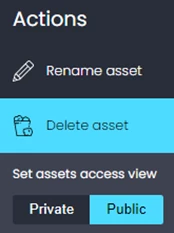
1.4 Click on Delete asset.
1.5 The asset will then be deleted and held in the recycle bin for 90 days and will no longer display in Explorer or on the Access Portal.