

Welcome to the AI in Archives Group!

  • June 19, 2026
  • 6 replies
  • 86 views

Sarah Pearce
Forum|alt.badge.img+1

Welcome and thank you for joining the AI in Archives group. 🤝

This group is designed exclusively for Preservica users to share ideas, help shape these powerful new capabilities and discuss best practice with other members. Feel free to get involved, ask a questions and share suggestions. 

We’d love to hear your experience with Preservica’s AI tools - let us know how you’re getting on below 👇

6 replies

Forum|alt.badge.img+5
  • Known Participant
  • July 17, 2026

Is the AI trial truly already available in all of our editions? I thought we had to request the trial.


Rosie Clarke
Forum|alt.badge.img+6
  • Community Manager
  • July 20, 2026

Hi Kelly, the trial is running until August 31st and you can enable the features yourself in your enrichment policy - videos and documents showing how to set these features up and use them can be found in our New Features section.


The exception to this is the Metadata Quality Check feature for Enterprise Private Cloud customers only – they will need to speak to their Customer Success representative to get this particular feature enabled for the trial. 


Forum|alt.badge.img+5
  • Known Participant
  • July 20, 2026

Thanks. I have set up the enrichment policy but have a couple of questions. 

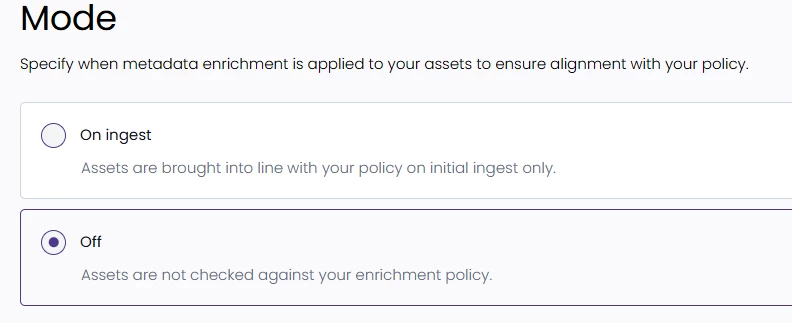
I do NOT want assets to be checked during ingest only. I want to select “Cluster analysis” for the folder specified in the policy and have those assets reviewed.

But the “Off” option seems to indicate that assets will not be checked again the policy under any circumstances?

So which option should I use?

I understand that OCR can only be done on ingest, but Cluster analysis isn’t described or demonstrated that way. It seems we should be able to do it at will in the folder location specified in the policy.


lcoufal
Forum|alt.badge.img+6
  • Inspiring
  • July 22, 2026

Thanks. I have set up the enrichment policy but have a couple of questions. 

I do NOT want assets to be checked during ingest only. I want to select “Cluster analysis” for the folder specified in the policy and have those assets reviewed.

But the “Off” option seems to indicate that assets will not be checked again the policy under any circumstances?

So which option should I use?

I understand that OCR can only be done on ingest, but Cluster analysis isn’t described or demonstrated that way. It seems we should be able to do it at will in the folder location specified in the policy.


Even though the initial config screen offers “On ingest” only, I believe you should still be able to run re-evaluation on already ingested content (folders or individual assets) as described here

Applying AI to ingested content by re-evaluating against Enrichment policy | Community


Paul Clark
Forum|alt.badge.img+5
  • Community Manager
  • July 22, 2026

Hello ​@Kelley Canon , and thanks ​@lcoufal.

The On-ingest mode is only applicable to the Transcription & Captioning, PII, OCR and Image analysis features. MQC/Cluster analysis is applied by analyzing against existing metadata against existing content. This is performed by right-clicking on the required folder and selecting Cluster analysis.

To perform Transcription & Captioning or PII enrichment against existing content using the right-click > Re-evaluate policy function does require the Enrichment policy mode to be set to On Ingest.

I hope this helps.

Thanks

Paul


Forum|alt.badge.img+5
  • Known Participant
  • July 22, 2026

Thanks for the info, but Cluster Analysis in general is not working for us. I have cancelled the ticket I submitted on this, however, since AI is far from the most important issue for our organization right now. When it rises in importance we will revisit this.